
Front End Integration
Some changes will need to be made to your site so that Loopa can get information about your listings, see which ones your visitors are viewing, and record when they act. The earlier these changes are made the better so Loopa can capture the most audience it can before we start advertising campaigns.
If you have a web development company or an internal team we can work with, they will need to read this document to get everything in place.
Site Script
Our site script, which will be provided to you separately, needs to be included in the page html head on all pages. Alternatively, if you use Google Tag Manager it can be included using Custom HTML as the tag type, set to fire Once Per Page on All Pages using the Page View event. Don’t worry, our script loads asynchronously so it won’t hold up the rest of your page from loading.
The publisher ID your provided is incorrect, please contact Signifi Media for your correct publisher IDConversion Events
Knowing when your visitors have reached a goal is important to measure as it provides data on what campaigns are succeeding. Working with our team you can track these events on your site and advise Loopa at the same time. Some example events that you might consider are:
- Form submissions
- Subscriptions or Social Sharing
- External Email or Phone Contact
Adding the following script to these events will keep you in control of when an action counts as a conversion:
<script>
window.loopa = window.loopa || [];
window.loopa.push({
	event: 'conversion',
	data: {
		transactionId: 'XXXX',
		value: 'XXX.XX',
		products: 'XXXX,XXXX,XXXX',
		type: 'XXXXX',
		currency: 'AUD'
	}
});
</script>
| Item | Description | Example |
|---|---|---|
| transactionId | (Optional) An order or transaction identifier if you want to track individual conversions. | 123456 |
| value | The numerical value, if this is a purchase event. Otherwise supply zero. | 99.95 |
| products | A comma-separated list of the listing(s) that this conversion is taking place on. | A56567,B22247 |
| type | (Optional) A label for the type of conversion taking place. This is helpful if we are recording multiple different conversions. | Contact Email |
Data Layer
Adding a data layer to your listing pages allows our script to easily fetch the data it needs. Additionally, it protects our script from needing updates if you make design changes to your site in the future. The following example is a fake property listing provided as JavaScript JSON, but it could alternatively be surfaced in a Meta Tag:
var loopaData = {
   "ProductId": "123456",
   "Price": "2995000",
   "Bedrooms": "2",
   "Region": "Perth Central",
   "District": "Western Australia"
   "Address": "U19, 44 St. George’s Tce, Perth",
   "HousingType": "Apartment",
   "SaleType": "SALE"
 };
Loopa API
Using our API to create and monitor your campaigns gives you instantaneous results and feedback. Some of the common methods are summarized below, and a full and up to date specification can be found at our online API documentation.
Feeds are also available in addition to API based integration and you can mix and match both feeds and API integration. For example, you could provide a feed of all the items on your website for Loopa to ingest and then call the Order API to create a campaign for a particular item from the feed.
Authorisation
Authentication for all requests is handled with a combination of your Loopa Publisher Id and an Authorization header within the request. Both will be provided to you separately in a secure method. The example below shows how this might look:
GET https://api.loopa.net.au/product/63fbdb2e81741da62c83eeda/A123456
Headers:
Authorization:P@ssword123
Content-Type:application/json
In the above example, the following data is used:
PublisherID: 63fbdb2e81741da62c83eeda
API Key: P@ssword123
ProductID: A123456
Listing Update
Loopa will already have basic information about your listing, gleaned from your site by our site script. This data usually only covers the minimum amount required to determine what kind of listings your audience is visiting. In order to run an advertising campaign for a listing we will often require additional data to use in the advert creative. Submitting this directly into Loopa also provides the most correct and up to date information for adverts.
POST https://api.loopa.net.au/product/{publisherId} {
  "Id": "string",
  "PublisherId": "string",
  "Title": "string",
  "ItemUrl": "string",
  "Description": "string",
  "MainImage": "string",
  "ImageList": [
    "string",
    "string"
  ],
  "Language": "string",
  "Price": 0,
  "BrandName": "string",
  "ProductType": "string",
  "Gtin": "string",
  "Mpn": "string",
  "Category": "string",
  "SubCategory": "string",
  "Stock": 0,
  "Enabled": true,
  "CustomField1": "string",
  "CustomField2": "string",
  "CustomField3": "string",
  "CustomField4": "string"
}
Listing data can also be provided to Loopa via a feed (XML/JSON/CSV). Speak with our technical team if this is something you already have.
Campaign Order
Once Loopa has all the listing information required, you can submit a campaign order. This will trigger a background job for Loopa to create all the assets and creatives required to run the campaign.
POST https://api.loopa.net.au/order/{publisherId}
{
  "Id": "string",
  "PublisherId": "string",
  "OrderGroupId": "string",
  "ProductId": "string",
  "Customer": "string",
  "StartDate": "2019-08-06T05:48:58.376Z",
  "EndDate": "2019-08-06T05:48:58.376Z",
  "PackageId": "string",
  "Status": "string",
  "CustomField1": "string",
  "CustomField2": "string",
  "CustomField3": "string",
  "CustomField4": "string",
  "ReportRecipients": [
    "string"
  ]
}
Orders can also be provided to Loopa via a feed (XML/JSON/CSV) and retrieved from Web or FTP sites. Speak with our technical team if this is your preferred approach to providing order information.
Campaign Statistics
If you wish to surface some progress statistics to your clients, for example in a dashboard, some basic campaign data can be retrieved ad-hoc. Loopa updates these statistics several times daily from our external networks.
GET https://api.loopa.net.au/stats/{publisherId}/order/{orderId}
Statistics can also be retrieved at a publisher level, see the online API for more information.
Webhook Subscriptions
You can use webhook subscriptions to receive API notifications about events, such as campaign creation success or failure. For each event a HTTP POST is sent to your subscribed endpoint, containing a JSON payload with the event details. See the online API for more information.
Reporting
Loopa will also provide some weekly progress and monthly reconciliation reports via email with a CSV attached as standard. Some of the fields that you might find useful are:
| Field | The amount of times your advert was shown across all platforms. |
|---|---|
| Impressions | The amount of times your advert was shown across all platforms. |
| Clicks | How many times your advert was clicked. |
| CTR | A percentage of the impressions that were clicked on. |
| Post View Conversions | The amount of conversions from users that viewed an advert. Not available for all platforms. |
| Post Click Conversions | The amount of times your advert was shown across all platforms. |
| Conversions By Type | A breakdown of the types of ways your users are converting. |
| Engagement | The amount of likes and comments on social platforms. |
| Progress Percentage | How much this campaign has progressed. |
Additionally, reports can also be emailed directly to your customers with statistics on their campaign if desired and the process of creating an appropriate report template can begin.
Campaign Customisation
Creative Design
Depending on your needs and budget, we can design and produce the creatives used for social and display campaigns. We may request high resolution copies of your logo or site assets if they will be integrated with the design, and any listing images will also need to be available when starting a campaign. Loopa also has some additional features for image processing to further customise your adverts:
- Resize and crop
- Static overlays and underlays using a constant theme
- Dynamic image overlays per listing
Most common advert sizes for display right now are:
- 300 x 250 “Medium Rectangle”
- 320 x 50 “Mobile Leaderboard”
- 728 x 90 “Leaderboard”
- 160 x 600 “Wide Skyscraper”
- 300 x 600 “Half Page”
Audience Segmentation
Visitors to your site will be placed into several segments, depending on the listings that they view. This allows Loopa to target an effective audience when starting a campaign for one of your listings. Our team will work with you to determine how best to separate your audience pool, creating segments that are a balance between being highly targeted users (small in number but highly interested) and reaching a wide audience (large group of potentially interested users).
The details, properties, and categories of your listings can be used individually or in combination:
- Categories – String-matched details of the listing that would group together others that are similar. For example, in Real Estate this could be Suburb/City, or the style of building.
- Number ranges – For numerical details like Price or Age we support pre-defined ranges that listings can be placed into.
- Related Categories – If you have relational lookup values for some details then Loopa can also target them. For example, a listing’s City could have a list of 5 nearby related cities.
Package Levels
Depending on your situation, you may want to offer one or more different options when starting a campaign. We will work with you to determine the values of the following options, and possible multiple levels:
- Impression count goal
- Media spend limit
- Duration
Facebook Access
In order for us to run ads on your behalf we will need access to your Facebook business page. Please follow the next steps to grant us access:
Ensure you are the Administrator for the Facebook Business Manager that has claimed your Facebook page and login to the account using a desktop or laptop computer.
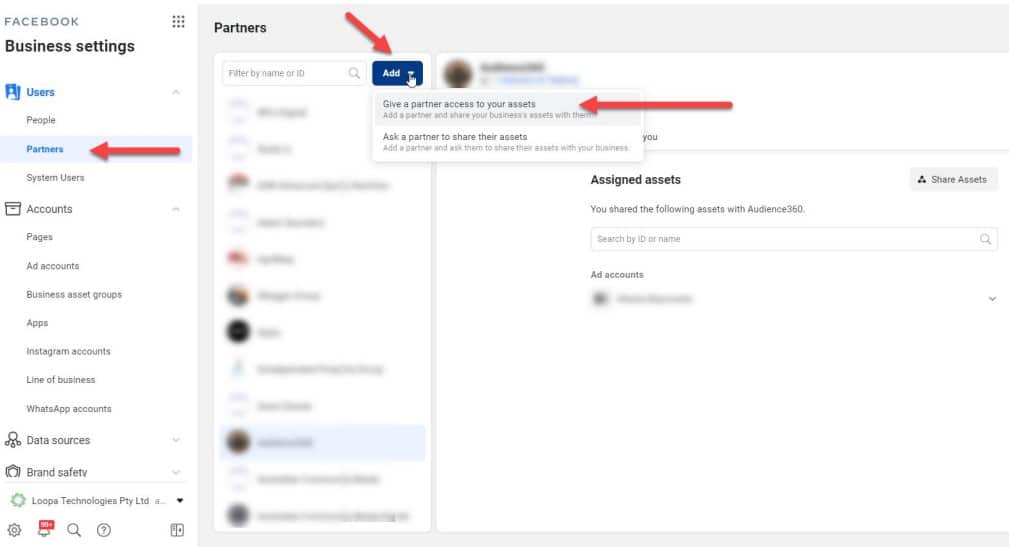
Step 1: Go to Business Settings
Step 2: Click on “Users” then “Partners”
Step 3: Click on the “Add” button
Step 4: Click on “Give a partner access to your assets”
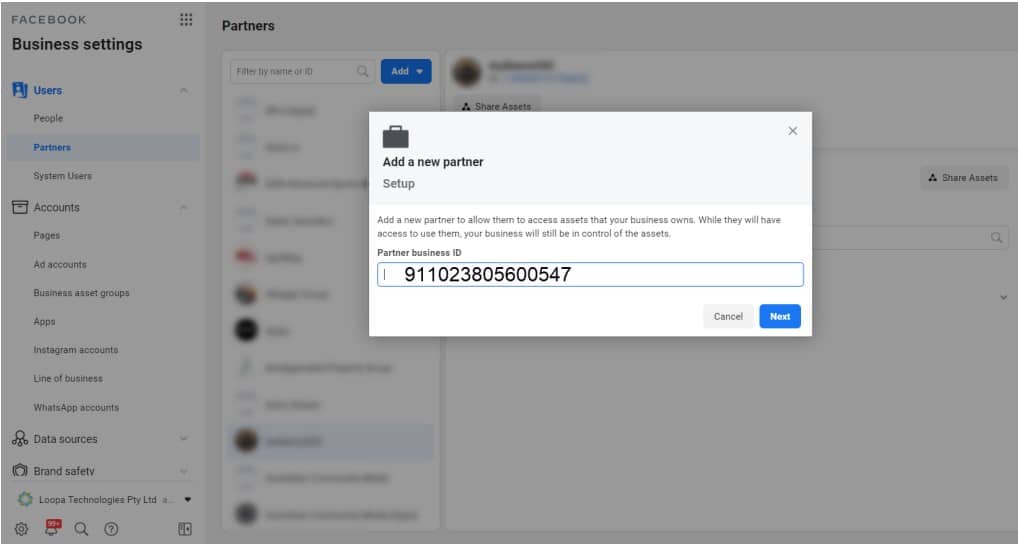
Step 5: Enter the ID for Loopa Technologies 911023805600547 in the “Partner business ID” field
Step 6: Click on the “next” button
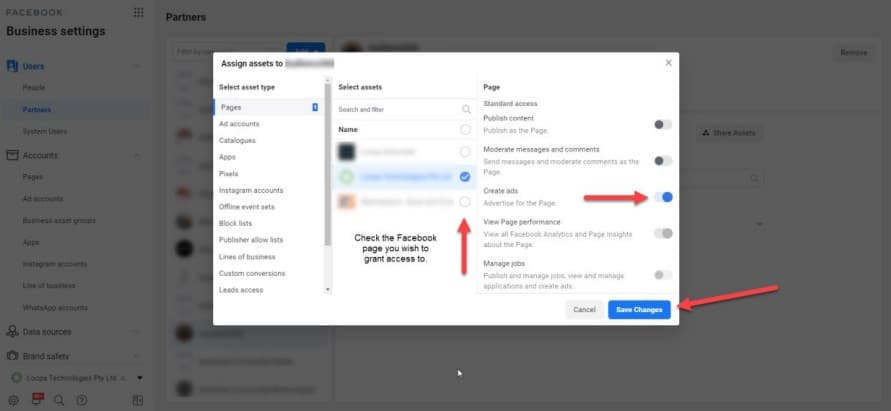
Step 7: Check (tick) the Facebook page you wish to grant access to.
Step 8: Click the toggle to the right, next to “Create ads.”
Step 9: Click the “Save Changes” button.
Domain Verification
If your domain has already been verified with Facebook, we will need it to be shared with our Facebook Business Manager.
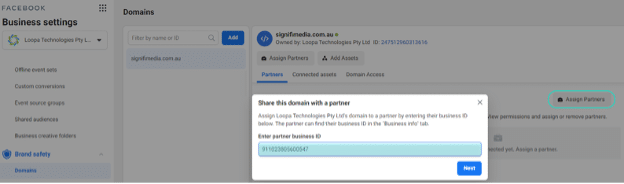
Step 1: Go to Facebook Business Manager, then
Business Settings
Step 2: Click on “Brand
Safety” followed by “Domains” on the left side
Step 3:
Click on the verified domain you wish to share with us,
click on ‘Assign Partners’, then enter our Business ID
911023805600547
Step 4: Click on the ‘Next’
button. All done! Domain has now been shared with Loopa Technologies
Note that domain verification is mandatory if you wish to run campaigns on Facebook with conversion objective. In case it has not yet been verified, you will first need to verify your domain with Facebook before sharing it with our Facebook Business Manager.
Facebook Pixel
Do you have a Facebook pixel already set up and conversion events already ranked?
- Yes – we will require the pixel and conversion events (including custom conversions) to be shared with our Facebook Business Manager id 911023805600547.
- No – we will create a pixel and conversion events including custom conversions. We will then share them with your Facebook Business Manager so you can rank the conversion events accordingly. To rank the events, please follow the next steps:
Step 1: Go to Facebook Business Manager, then Events
Manager. The Business Manager must be the same one where you
verified your domain from.
Step 2: Search for
the Facebook Pixel (ensure that you have accepted the pixel we
shared with you by going to your Business Settings > Data Sources
> Pixels). Once the pixel loads, click on Aggregated Event
Measurement (AEM), followed by ‘Configure Web Events’.
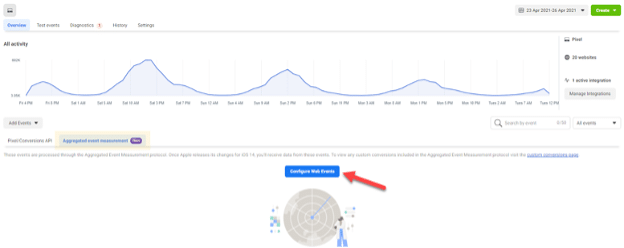
Step 3: On the ‘Web Event Configurations’ page search for the domain you wish to rank the conversion events. Select the domain then click on ‘Manage Events’
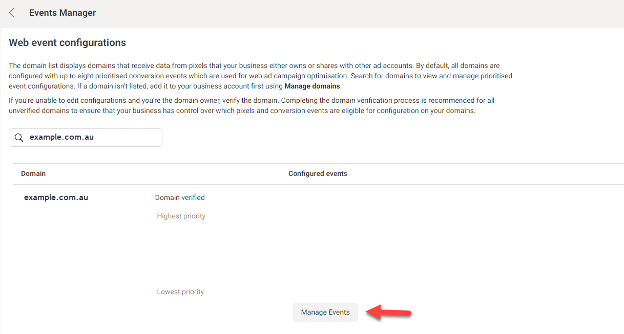
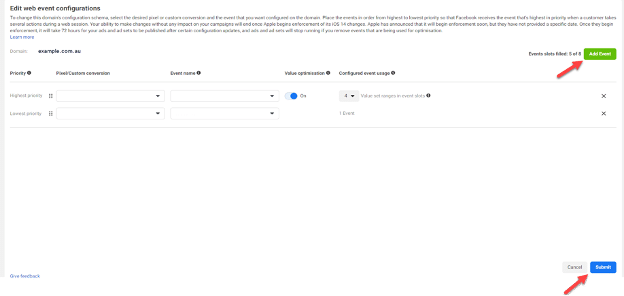
Step 4: You will now need to rank the events from the highest to the lowest priority (1-8), the highest priority is the event that matters most to your business (i.e. purchasing on an ecommerce store, submitting an enquiry if you are after leads etc.). If you don’t have any events or are unsure which ones to rank, let us know and we’ll provide some advice.
You can rank up to 8 events. Click on ‘Add Event’, then choose the pixel or custom conversion followed by the first event you wish to rank with the highest priority (follow the same process if you have more than 1 event to be ranked) then click on ‘Submit’.
Legal
When you use Loopa Tracking on your Website, you should maintain a clear and prominent link from your website to your privacy policy that clearly explains that (a) third parties may use cookies, web beacons, and similar technologies to collect or receive information from your website and elsewhere on the internet and use that information to provide measurement services and target ads, (b) how users can opt-out of the collection and use of information for ad targeting.
Our Privacy policy is located here: https://www.signifimedia.com.au/home/privacy
An
example is as follows, however you should seek your own legal
guidance as to if the following is appropriate for your business:
Our site uses a range of 3rd party persistent cookies to identify the products you visit and to personalise off-network advertising so as to serve relevant and contextual advertising. These 3rd party cookies and Device IDs will assist us in collecting aggregated contextual data so as to serve more relevant content to you via programmatic channels. The cookies enable us to understand and improve the delivery of adverts to you, and know when certain ads have been shown to you. Since your web browser may request advertisements and web beacons directly from ad network partner servers, these networks can view, edit, or set their own cookies, just as if you had requested a web page from their site. You can opt out of off-site and third-party-informed advertising by adjusting your cookie settings. For more information on your ad choices online and other services you can opt out of targeted advertising from our advertising partners at any time by visiting:
- https://rtb.loopa.net.au/pixel/optout (Signifi Media)
- https://www.facebook.com/policies/cookies/ (Facebook)
- https://support.google.com/ads/answer/2662922?hl=en-AU (Google)
- http://youradchoices.ca/choices/ (multiple opt out options)
Please note that disabling cookies will affect the functionality of our Website, and may prevent you from being able to access certain features on our Website. For further information about deleting or blocking cookies, please visit: http://www.aboutcookies.org/how-to-delete-cookies/
Important Note! By continuing to use our Website, you are agreeing to the placement of cookies on your computer by us and our third party service providers. You may withdraw your consent at any time. If you do not wish to accept cookies in connection with your use of this Website, you must stop using our Website and disable cookies via your browser settings for this Website or globally.